Aspire is a free budgeting spreadsheet for Google Sheets. Plan every available dollar, track category balances, and adjust when life changes — all in your own Google Drive.
No Aspire account. No credit card. Start with your own copy.


"The Aspire Budgeting Spreadsheet is so popular it has its very own Reddit community."
— Tiller, Reddit's Top Recommended Budget Spreadsheets
"Your spreadsheet helped me budget to the cent through my first 2 years in a new country. It put me on track to becoming financially stable."
— Reuben, Aspire user
"Aspire actually implements monthly funding with rollover, just like YNAB."
— FinancialAha, Aspire Budgeting alternatives
Give every available dollar a job. Create custom categories, assign your income, and track what you spend with envelope-style zero-based budgeting.
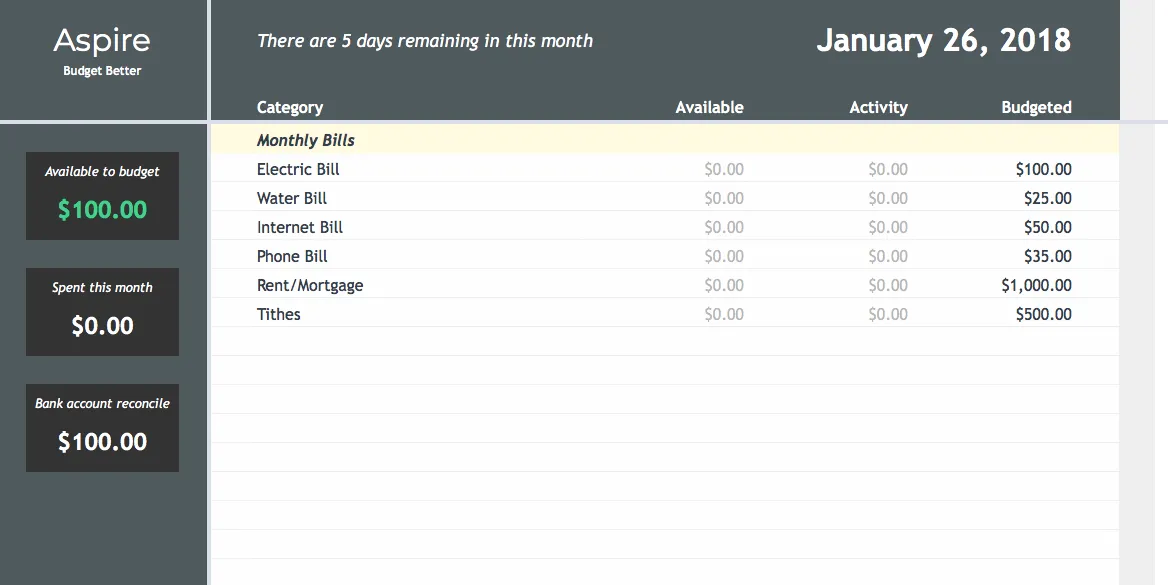
One tab that shows everything at a glance: category balances, account totals, Available to Budget, and monthly activity.
Budget together in real time. Share your spreadsheet with a partner, family member, or financial advisor — no extra accounts or fees.
Aspire never asks for your bank credentials or maintains a connection to your accounts. Your transaction data stays in your Google Sheet.
Explore spending, monthly trends, income vs. expense, budget vs. actual, and money flow with shared filters and transaction drill-downs.
Customize categories and groups, then build your own views on separate tabs. Changes to Aspire's core formulas and layout are best left to advanced users.
Choose your budget currency, let the sidebar follow your browser’s familiar number conventions, and control spreadsheet currency and date formats with two sample cells.
Switching from YNAB? Export your Register CSV and bring your transaction history into Aspire. Account, date, payee, category, memo, outflow, and inflow fields are imported free.
Install the free Aspire Budgeting add-on and get these reports instantly — no subscription required. Try them below on a sample budget.
Aspire Budgeting · Reports
Interactive demo with sample data
Switch reports, change the date range or filters, and click a chart to see the transactions behind it.
How each report works:
New to Aspire? Follow the setup guide or browse the budgeting guides.
You only need the spreadsheet to start budgeting. Add the free add-on for reports, and Turbo if you want to save time.
Copy the budget to your Google Drive. Assign every dollar, record transactions, and see category balances on the Dashboard.
Get the free spreadsheetInstall it from the Google Workspace Marketplace to add five interactive reports, diagnostics, and YNAB import inside Sheets.
Install the add-onCatch up faster with CSV import, auto-categorization, Quick Budget, recurring expenses, split transactions, and Aspire Mobile.
See what Turbo addsThey fall behind on entering transactions — and never catch up.
Aspire Turbo helps you catch up fast: import a bank CSV, categorize transactions from your own history, fund categories in one pass, and keep up from your phone with Aspire Mobile. No bank password required.
Save time every month with faster imports, smarter categorization, quick budgeting, subscription tracking, and Aspire Mobile. Month-to-month, cancel any time.
Payment method required. Your subscription starts automatically after 30 days unless you cancel. Taxes may apply.
Open the sidebar inside Google Sheets to import transactions, run reports, and use Turbo tools without leaving your budget.
Download your bank statement, drop it in. Smart column mapping remembers your format — one click import from then on.
Infers Payees and Categories from your reviewed history, then marks changed cells by confidence. No AI or external services.
Fund all your categories in one click based on your targets and goals. Review, adjust, then done.

Automatically finds subscriptions and recurring bills in your history. Spot forgotten charges, catch price increases, and see your total recurring spend.
Divide a single purchase across multiple budget categories. One Target run, two categories — each reflects what you actually spent.
Also included with Turbo
Check category balances, review recent transactions, and record purchases from a phone-friendly app connected to the Aspire spreadsheet you choose.
Since 2018
Aspire started as a weekend spreadsheet and grew because people kept using it. Here is how it got here.
2018
The first Aspire spreadsheet, built to fill a free morning.
Mar 2023
Setup guides, how-tos, and troubleshooting in one place.
Dec 2024
A refreshed Dashboard, upgraded reports, and goal estimators.
Jul 2026
Interactive reports, guided imports, and diagnostics inside Sheets.
Jul 2026
Check balances and add transactions from your phone.
Today
Your budget lives in your Drive and never needs your bank login.
Aspire combines zero-based envelope budgeting with a Google Sheet in your Drive, no required subscription, and no required bank connection.
| Tool | Pricing | Zero-based budgeting | Your data | Transaction import |
|---|---|---|---|---|
| Aspire Budgeting | Free core | ✓ | Your Google Drive | CSV import (Turbo, $5/mo) |
| YNAB | $109/yr or $14.99/mo | ✓ | Their servers | Bank sync or file import |
| Tiller Money | $99/yr | Not in Foundation Template | Your spreadsheet | Bank sync or CSV import |
| EveryDollar | Free or $79.99/yr | ✓ | Their servers | Bank sync (Premium) |
| Goodbudget | Free or $80/yr | Envelope budgeting | Their servers | Bank sync (Premium) |
Copy the free Google Sheets budget template, add your accounts and categories, and give this month's dollars a job.
Already budgeting with Aspire? Try Turbo free for 30 days →
 Aspire Budgeting